The why
If we share our home network with suspicious (IoT) devices and guests, we can never be sure our network is secure. It would be good if we could keep non-trusted devices on a different network, separate from the trusted devices.
A possible topology
The solution is to nest a trusted network under a non-trusted network. This will be enough to ensure that the trusted devices can access the whole network, but that the non-trusted devices can’t access the private network.
It can go as follows:
- The ISP provider WiFi router provides a guest network;
- A mini PC (like PC Engines apu4),
running (Debian
trixie), as a gateway between the guest network and the private subnet.; - A network switch to connect all trusted devices in the private subnet (DGS-1100-5PDV2);
- A WiFi Access Point for the private subnet trusted WiFi devices (EAP225).
They would be connected as show in the picture bellow:
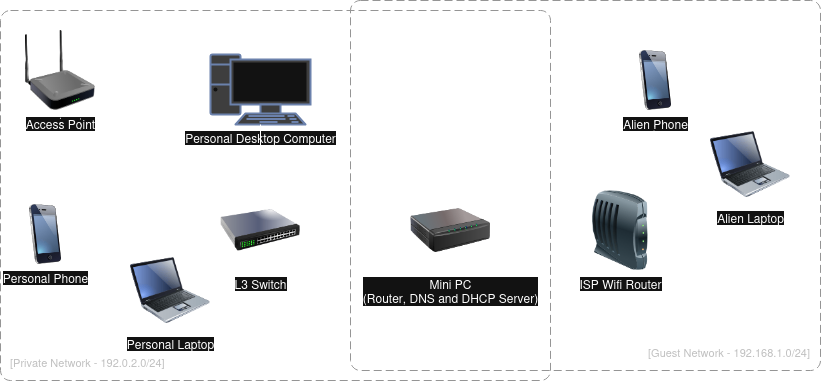
Mini PC Routing/Gateway configuration
The ISP router is configured to provide the subnet 192.168.0.1/24 (Guest
subnet). The Mini PC
will get an IP via DHCP from it on its enp1s0 interface.
The private subnet will be configured on the Mini PC enp2s0 interface and the
Mini PC will forward packets from the private subnet (192.0.2.0/24) via
192.168.1.1, the gateway of the Guest subnet.
All the routing and interface configuration can be done as follows:
- Install required packages:
sudo apt install iptables iptables-persistent
- Enable packet forwarding:
echo "net.ipv4.ip_forward=1" | sudo tee -a /etc/sysctl.d/router.conf
sudo sysctl --system
- Configure the subnet interface by adding to
/etc/network/interfaces:
auto enp2s0
iface enp2s0 inet static
    address 192.0.2.1
    netmask 255.255.255.0
- Configure the routing:
To allow internet access from our private network we can create some iptables rules to configure NAT. This can be achieved by:
sudo iptables -t nat -A POSTROUTING -o enp1s0 -j MASQUERADE
sudo iptables -A FORWARD -i enp2s0 -o enp1s0 -j ACCEPT
sudo iptables -A FORWARD -i enp1s0 -o enp2s0 -m state \
     --state RELATED,ESTABLISHED -j ACCEPT
In order to reduce attack surface in our private network, we can add some extra rules to prevent access to our internal network from the guest network:
# Accept connections from our private network
sudo iptables -I INPUT -s 192.0.2.0/24 -j ACCEPT
# Accept from loopback interface
sudo iptables -A INPUT -i lo -j ACCEPT
# Drop everything else
sudo iptables -P INPUT DROP
sudo iptables -P FORWARD DROP
With that, the router will only accept requests starting from our private subnet, rejecting everything else, making the host effectively inaccessible by an attacker that manages to be on the guest network.
- Make
iptableschanges persistent:
sudo netfilter-persistent save
Mini PC DHCP configuration (and DNS for the subnet)
We need to have a DHCP server in the private subnet. We will use
kea-dhcp-server (an overkill, but why not…).
- Install
kea-dhcp-server:
sudo apt install kea-dhcp-server
- Configure
keaDHCP (/etc/kea/kea-dhcp4.conf):
"Dhcp4": {
    "interfaces-config": {
        "interfaces": [ "enp2s0/192.0.2.1" ],
        // force failure if enp2s0 is not coninterface is not configured and up.
        "service-sockets-require-all": true,
    },
    "option-data": [
        {
            "name": "domain-name-servers",
            "data": "192.168.1.1"
        },
    ],
    "subnet4": [
        {
            "id": 1,
            "subnet": "192.0.2.0/24",
            "pools": [ { "pool": "192.0.2.1 - 192.0.2.200" } ],
            "option-data": [
                {
                    "name": "routers",
                    "data": "192.0.2.1"
                }
            ],
        }
    ]
}
- Ensure DHCP restarts on failure (during boot it would fail if the interface has invalid IP address):
cat <<EOF > /etc/systemd/system/kea-dhcp4-server.service.d/override.conf
[Service]
Restart=on-failure
RestartSec=10
EOF
- Restart DHCP service:
sudo systemctl restart kea-dhcp4-server.service
Conclusion
At this point we can connect our switch (that must have been configured to have its IP configuration retrieved via DHCP) and connect the other devices to it. When connecting the other devices (e.g. Desktop computer and Access Point) they would get their IP configuration from the Mini PC DHCP server.
By replicating the above you can have a private network isolated from an untrusted network.